

The year has passed, and we’ve crossed the finish line with a series of exciting updates and news across XWiki, XWiki Cloud, Cristal, CryptPad, and our Pro Applications. This past quarter brought major improvements to collaboration, performance, and usability.
Without further ado, let's get into it. (To jump straight to a topic, click it in the table of contents below.)
XWiki standard
*
TL;DR
- We've improved real-time editing with cluster support, per-user //Undo/Redo//, and session-preserved edits.
- S3 storage and clustering have been improved for attachments, pages, and better scalability.
- We've introduced a new picker for easier parameter selection in the macro configuration.
💡 Test the new features and improvements and let us know what you think.
#1 Real-time editing improvements
Real-time editing can look simple for end users, but it can be a real headache for developers. That's why, in Q4 we worked on refining real time in XWiki, addressing edge cases and making sure collaboration goes smoothly.
Here's what's new:
- Real-time editing works in clustered setups, making collaboration smoother in enterprise environments.
- //Undo/Redo// is handled per user, so pressing
Ctrl+zwon’t accidentally remove someone else’s changes. - Unsaved edits are preserved in session storage, helping you recover your work if you leave the editor by mistake.
- No empty revisions are created when you return to view mode without making changes.
💡 Try out the new enhancements, let us know what you think of them, and please report any issue you encounter.
#2 S3 storage and clustering improvements
To better support XWiki deployments at scale, we’ve expanded and improved our clustering and storage capabilities. The following enhancements are especially useful for enterprise and high-availability use cases:
- Attachments, deleted attachments, and deleted pages can now be stored in Amazon S3 or any S3-compatible storage.
- A new Blob Store API is available to configure Amazon S3 or an S3-compatible object store.
- A remote observation module provides cluster-related information through a dedicated administration page.
💡 Try running XWiki in a cluster with S3 storage and share your feedback with us.
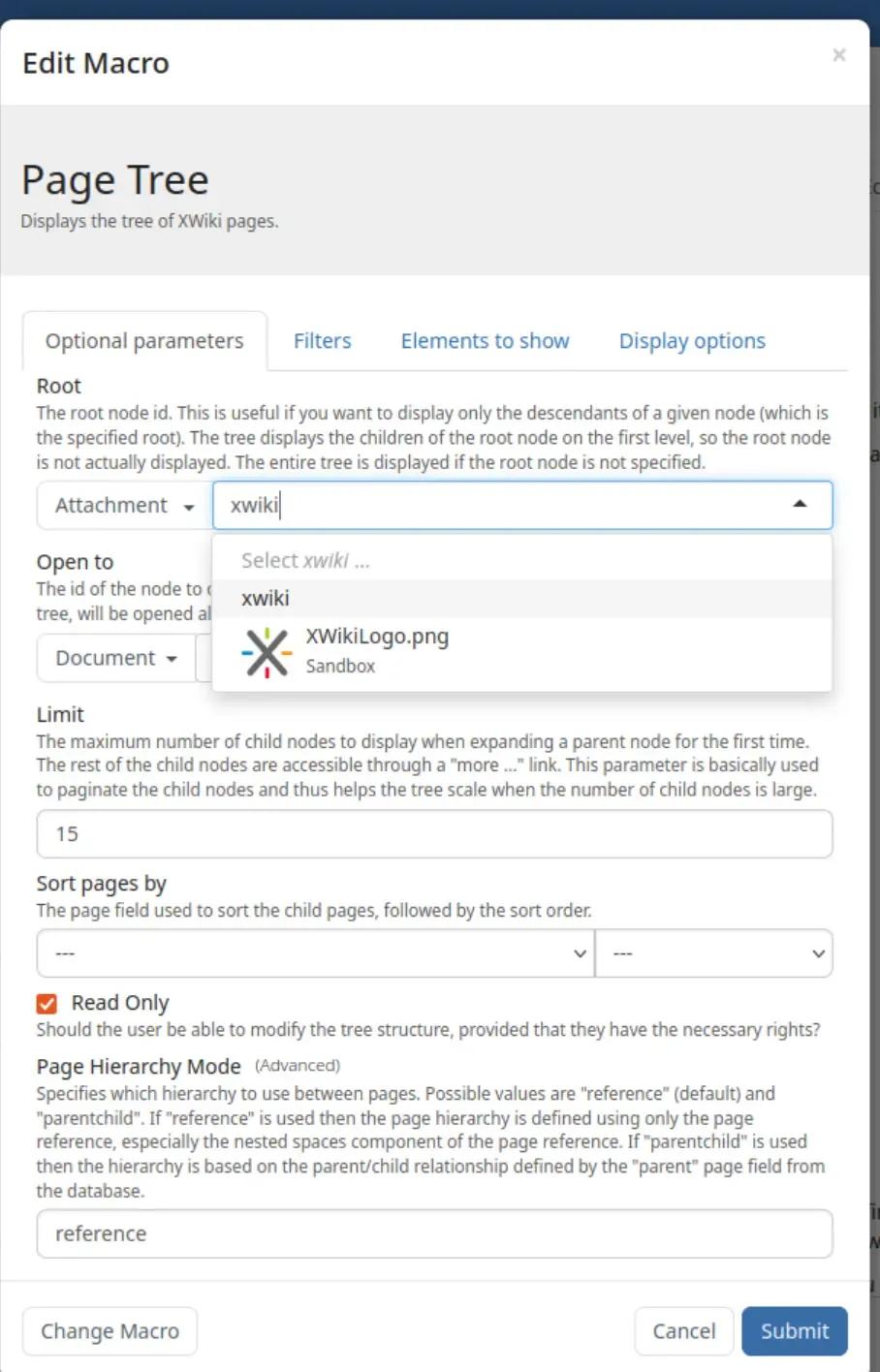
#3 Easier macro configuration with a new picker
Now it's easier to configure the Document Tree and Children macros. The XWiki Dev team has introduced a new picker to simplify selecting parameters such as the root.
With this improvement:
- Most parameter types now use a location suggester, making it easier to find and select the right node from where the page comes from.
- Manual reference input is still necessary for specific advanced use cases.
👉 Check out the documentation for more details.



What’s next
A new version of Font awesome has been released, so we're upgrading it in XWiki as well. Here is the link to the new package of icons that will be available soon.
We're currently defining next year roadmap, so stay tuned!
XWiki Cloud
*
TL;DR
- All instances are upgraded to v16.10.12 with bug fixes, security, and performance improvements.
- We've added Transport Layer Security (TLS) 1.3 and IPv6 support for faster and more secure connections on newer devices.
- Lastly, we've improved our internal tools to help our Support team resolve issues more efficiently.
#1 Instances upgraded to version 16.10.12
All XWiki Cloud instances were upgraded to version 16.10.12, which includes bug fixes, security, and performance improvements. We regularly upgrade cloud instances so clients and testers always benefit from the latest enhancements.
Additionally to these, we also worked on performance improvements of the XWiki Cloud service itself.
💡 We're always happy to hear your thoughts. Let us know what you would like us to introduce or improve in XWiki Cloud.
#2 Technical improvements for TLS
In the previous quarter, we added support for TLS 1.3, providing faster and more secure connections, as well as support for IPv6. Users on newer devices now can experience better security and slightly quicker load times.
TLS is a cryptographic protocol that ensures secure communication over computer networks, including the Internet. While it is used in applications like email, instant messaging, and voice over IP, its most widely recognized role is in securing HTTPS connections.
#3 Improved internal tools
We've improved various internal tools that will help our Support team diagnose better and solve XWiki Cloud related issues quicker.
Pro Applications
*
TL;DR
The fourth quarter of 2025 brought significant updates across several XWiki Pro Applications:
- OpenProject Integration (Pro) brings OpenProject work packages into XWiki as an open-source alternative to Jira and Confluence.
- Confluence Migration Toolkit makes migrations safer and easier with clearer reports and metadata support.
- Calendar Application (Pro) fixes import and UI issues for a more reliable experience.
- Task Manager Application (Pro) adds custom task description templates, multiple assignees, faster workflows, and several bug fixes.
- Diagram Application (Pro) improves PDF exports, clickable links, and remote diagram embedding.
- XWiki Network (XNNG) provides a more stable, secure platform with multi-year purchasing plans and a better client information e-mail system.
- All Pro Applications received minor bug fixes and usability improvements for smoother, more reliable use.
#1 Launch of OpenProject Integration (Pro) 🎉
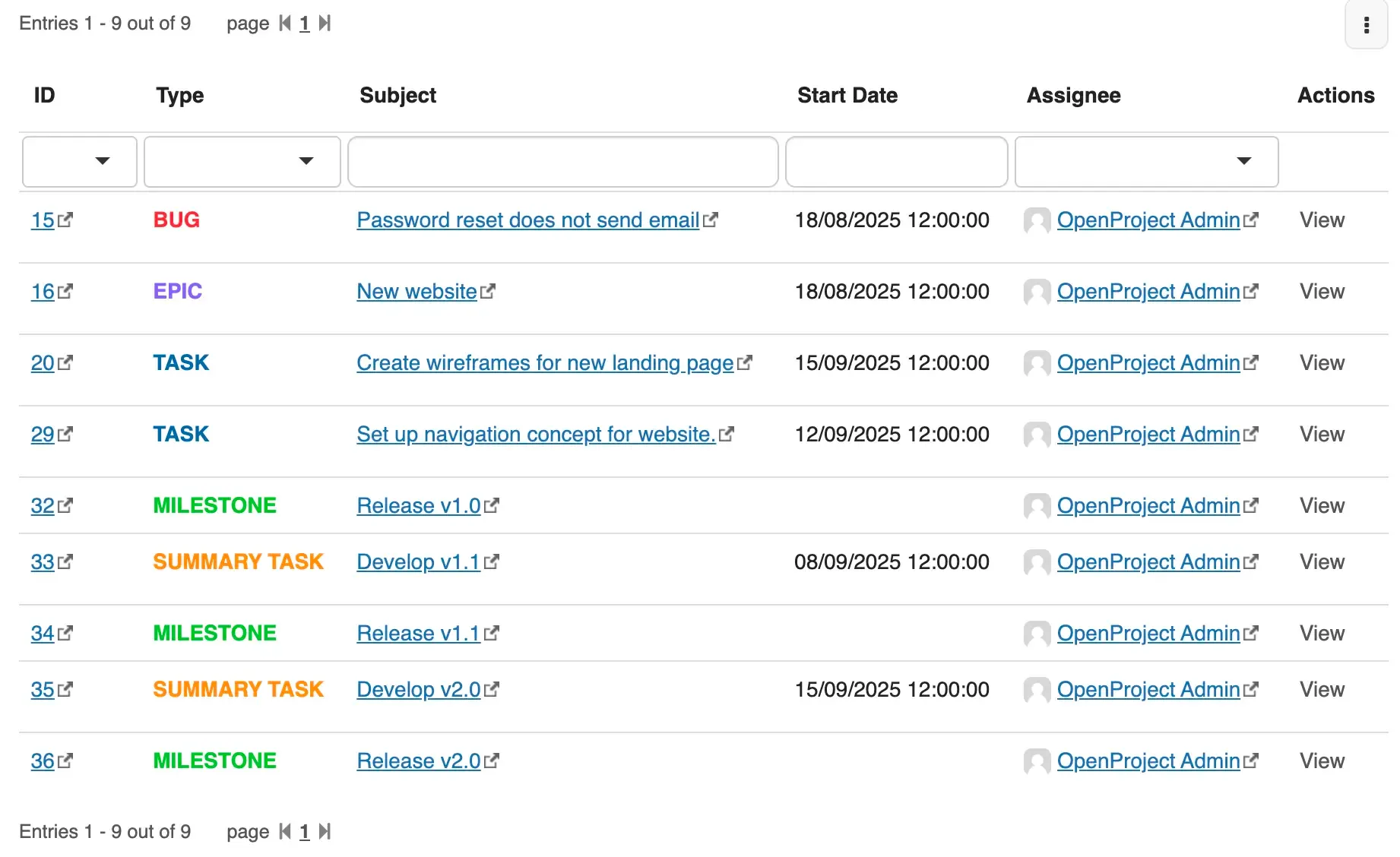
If Atlassian's announcement to end its Data Center products in 2029 sparked concerns in your IT department, then this Pro App is for you. The integration allows you to view your OpenProject work packages inside XWiki using filters already defined or new ones created in your XWiki instance. This integration provides a much needed open-source alternative for Jira and Confluence and a consistent view over both knowledge and execution.
💡 Install OpenProject Integration (Pro), test it, and share your feedback on encountered issues through the Store form or in the GitHub repository.
📹 Last quarter we hosted a live webinar, where our teams from XWiki and OpenProject showed how to move away from Atlassian Confluence and Jira Data Center to an open-source stack you fully control.
#2 Confluence Migration Toolkit
In the previous quarter, we continued improving the Confluence Migration Toolkit to make migrations clearer, safer, and more comfortable to use.
Here's what's new:
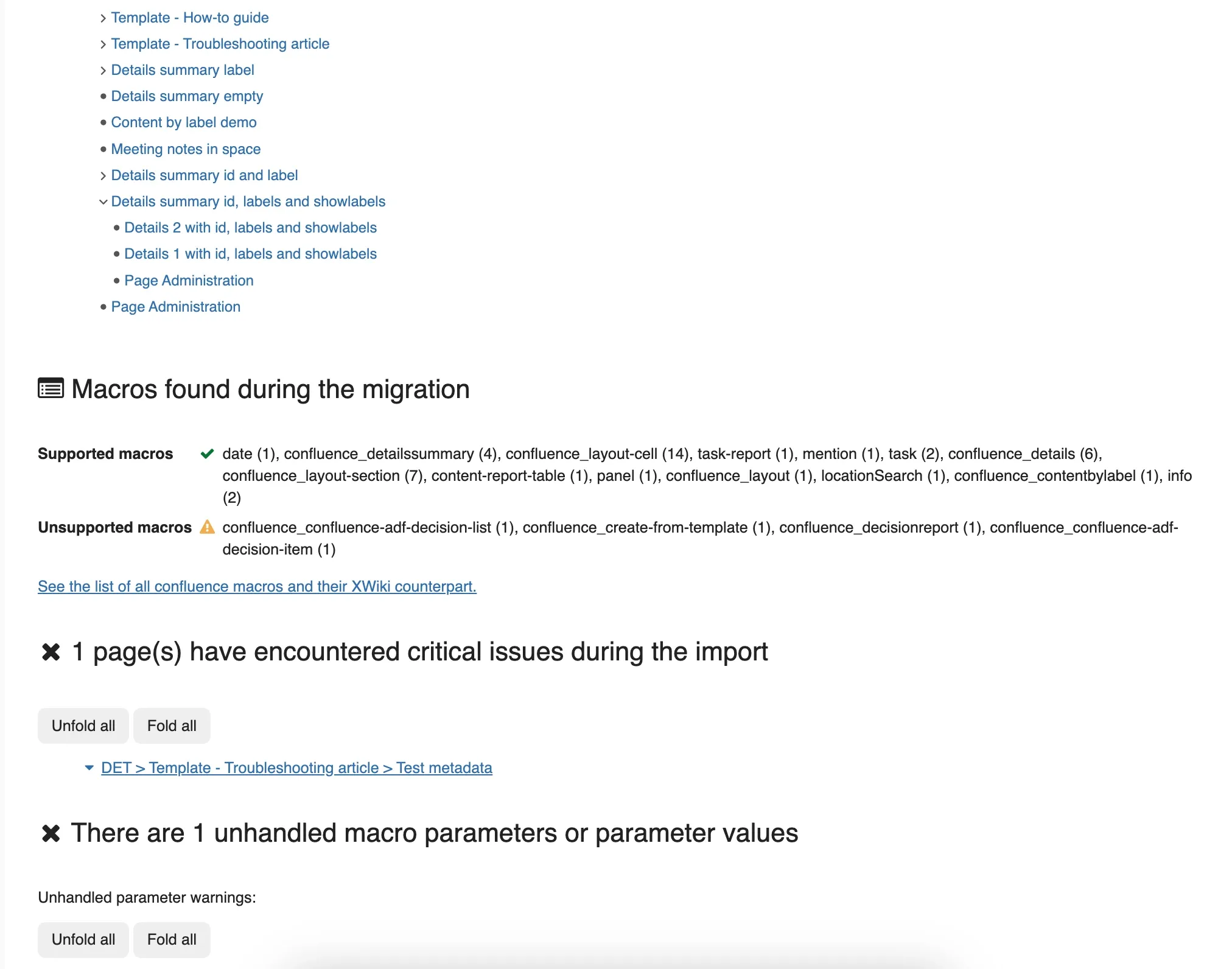
- Migration reports contain more details on imported pages.
- A warning appears before imported pages are overwritten.
- Metadata from Confluence can now be migrated alongside content through the Metadata (Pro). This app allows you to create metadata sets and insert them on pages with common fields. Metadata (Pro) is in beta for now and can also be used as a standalone app.
- Inline comments are now migrated as fully active annotations.
💡 Try out the latest version and let us know if you have any feedback about these improvements. Share your feedback in the dedicated form or open a GitHub ticket in the extension's repository.
#3 Calendar Application (Pro)
During Q4, the Calendar Application (Pro) received many bug fixes and stability improvements that make it more reliable and provide a better experience for users. Here are some of the solved issues:
- .ics file imports now work correctly.
- There is a new option to filter calendar on the create modal level.
- The description in the editor UI has been improved.
- You now have support for dynamic monthly recurrence.
- The bug about the ability to create all day events has been solved.
💡 Update to the latest version and take advantage of these fixes and improvements. Share your feedback in the dedicated form or open a GitHub ticket in the extension's repository.
#4 Task Manager Application (Pro)
The Task Manager Application (Pro) now offers more features and an improved user experience:
- You can now define custom task description templates.
- The macro dialog is skipped when inserting inline tasks for a faster workflow.
- Multiple users can be assigned to a task.
- Tasks now use LiveData instead of LiveTable.
- Various bugs have been fixed, including issues with task status updates, dependency listing, infinite recursion, display problems, and long task names in Kanbans.
💡 Update to the latest version and enjoy these fixes and improvements. Share your feedback in the dedicated form or open a GitHub ticket in the extension's repository.
#5 Diagram Application (Pro)
In Q4, the Diagram Application (Pro) received several bug fixes and improvements:
- PDF exports display diagrams correctly.
- Links in diagrams are now clickable.
- Diagrams can be embedded from external URLs.
💡 Update to the latest version, and let us know what you think. Share your feedback in the dedicated form or open a GitHub ticket in the extension's repository.
#6 XNNG
XNNG was updated to a newer XWiki version to provide better stability, functionality, and security. Other improvements include:
- Three-year plans are now available for purchase for XWiki Pro and Confluence Migration Toolkit, at a discounted price.
- We improved the client information e-mail system, offering quicker updates whenever the customer's attention is required, such as in the case of an available security update.
💡 Try out the new improvements on XNNG and let us know what you think!
#7 Stability and UX improvements
This quarter, we focused on fixing minor issues and improving the overall stability and usability of all Pro Applications.
💡 Update your applications to the latest version to enjoy a smoother, more reliable experience, and share your feedback if you notice any issues.
What's next
You can expect to see soon in XNNG an improved UI for orders and subscriptions and the option to setup recurring payments for any Pro App.
Cristal
*
TL;DR
- BlockNote is now the default editor in Cristal, bringing a more modern, Notion-like writing experience, and replacing the old editors.
- New message macros help you highlight important information with clear, colorful messages that stay consistent across multiple back ends.
- Settings are now easier to manage, thanks to a new configuration page designed to centralize options over time.
#1 BlockNote as the default editor
After a year of active development and testing, BlockNote is now the default editor in Cristal! This marks an important step toward a more modern, reliable, and enjoyable editing experience.
BlockNote offers a clean, block-based approach to writing that feels familiar to users of modern tools (similarly to Notion), while remaining fully open source and well integrated with the platform.
As part of this transition:
- BlockNote replaces the previous editors as the default choice.
- Tiptap has been removed and will no longer be maintained.
👉 Test the editor on cristal.demo.xwiki.com and let us know what feedback you have.
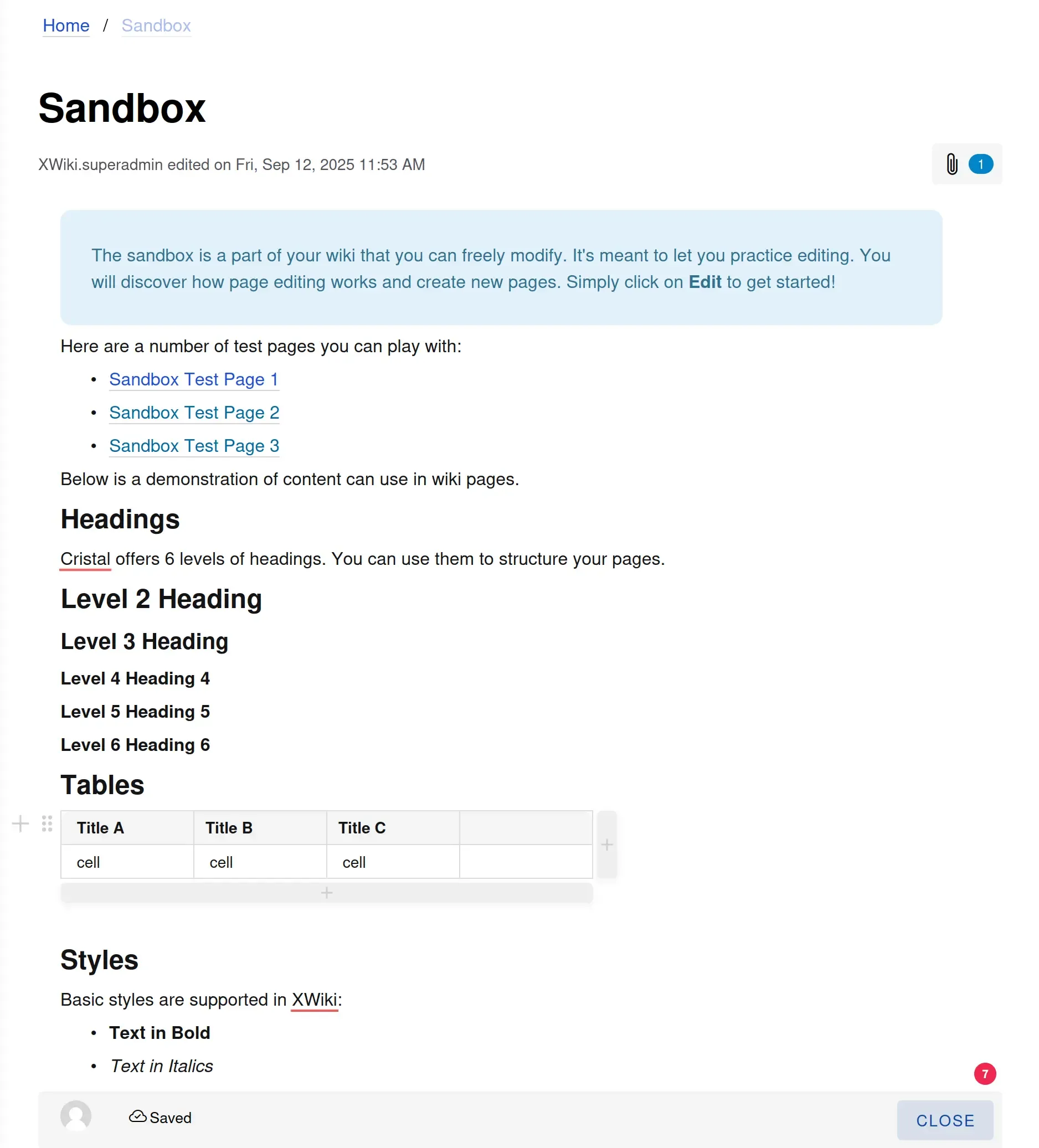
#2 New set of message macros
Cristal now includes a new set of message macros to help you highlight important information directly in your content. These macros let you display clear, colorful messages such as information, warnings, errors, or success notes. This helps making pages easier to read and understand and they're saved across different back ends.
👉 Tell us what are the next macros you want us to make compatible with Cristal!

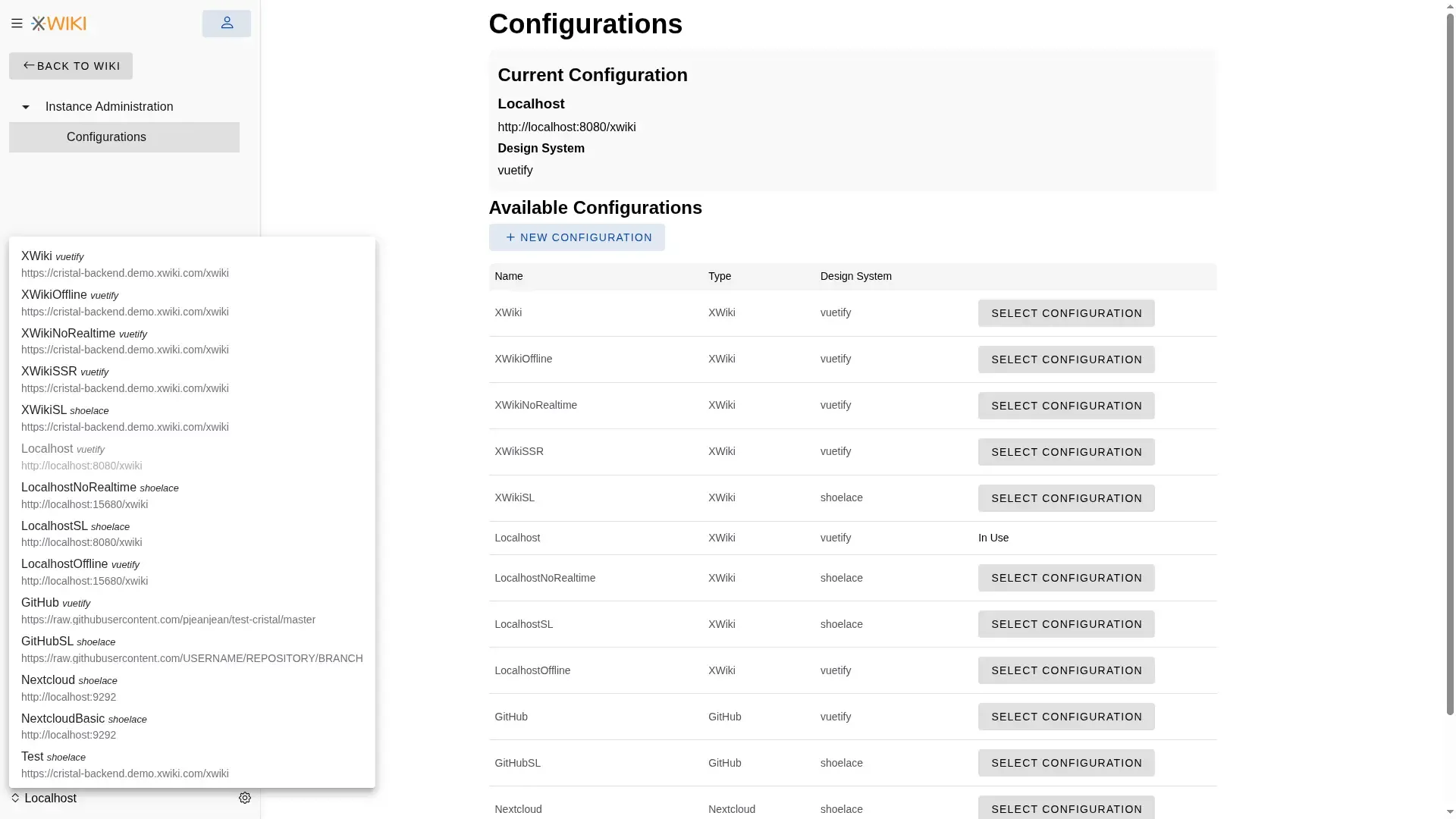
#3 UI improvements for configurations
We overhauled the process to switch and manage configurations in Cristal. Instead of the previous modal, we integrated a settings page that over time will centralize all the settings.
👉 You can check out the updated documentation and send us your feedback.
What's next
We're working on creating a Cristal extension available on the Nextcloud store. We hope to release it just in time for FOSDEM'26.
CryptPad
*
TL;DR
- We replaced Font Awesome 4.7 and custom web fonts with a new fork of Lucide icons.
- The loading screen has been simplified to create a cleaner, more polished first experience for new users.
- The back end is being rewritten to run across multiple nodes.
- Rich Text will be replaced by BlockNote.
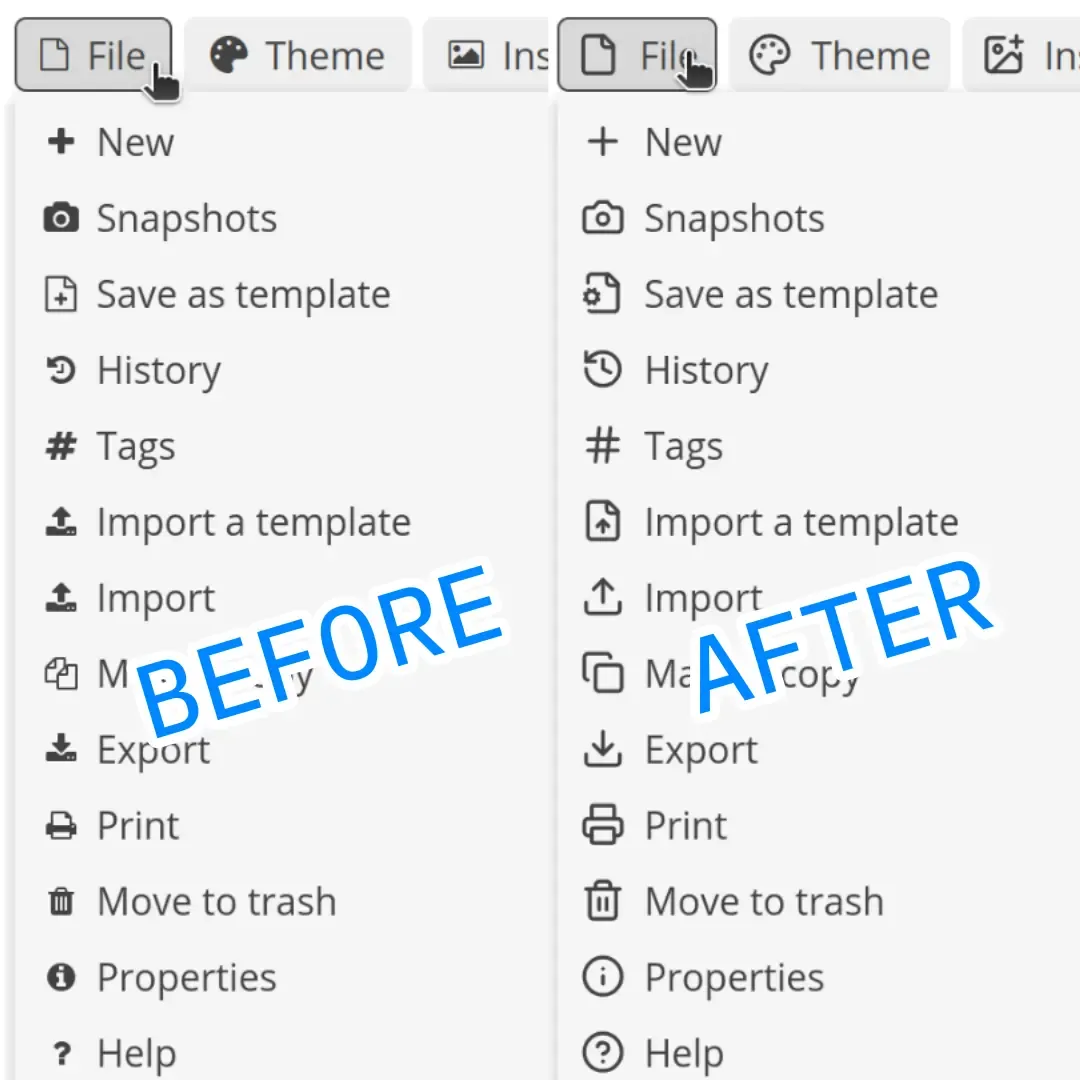
#1 Icons update
We finally replaced Font Awesome 4.7 (released in 2016) and custom web fonts with our new fork of Lucide icons that includes application icons and customizations.
The work to replace the icons was substantial as they are used in almost every part of the CryptPad interface. We implemented this upgrade in a way that makes any future change much easier, as only one file would need to be edited.
👉 Please see the release notes for more details.
💡 Check out the new icons on cryptpad.fr, our flagship instance.
#2 Simplified loading screen
In the previous quarter, we focused on simplifying the loading screen. It’s often the first thing new users see, so we gave it a cleaner, more polished look that clearly highlights CryptPad’s end-to-end encryption.
👉 Please see the release notes for more details.
#3 Scalable server
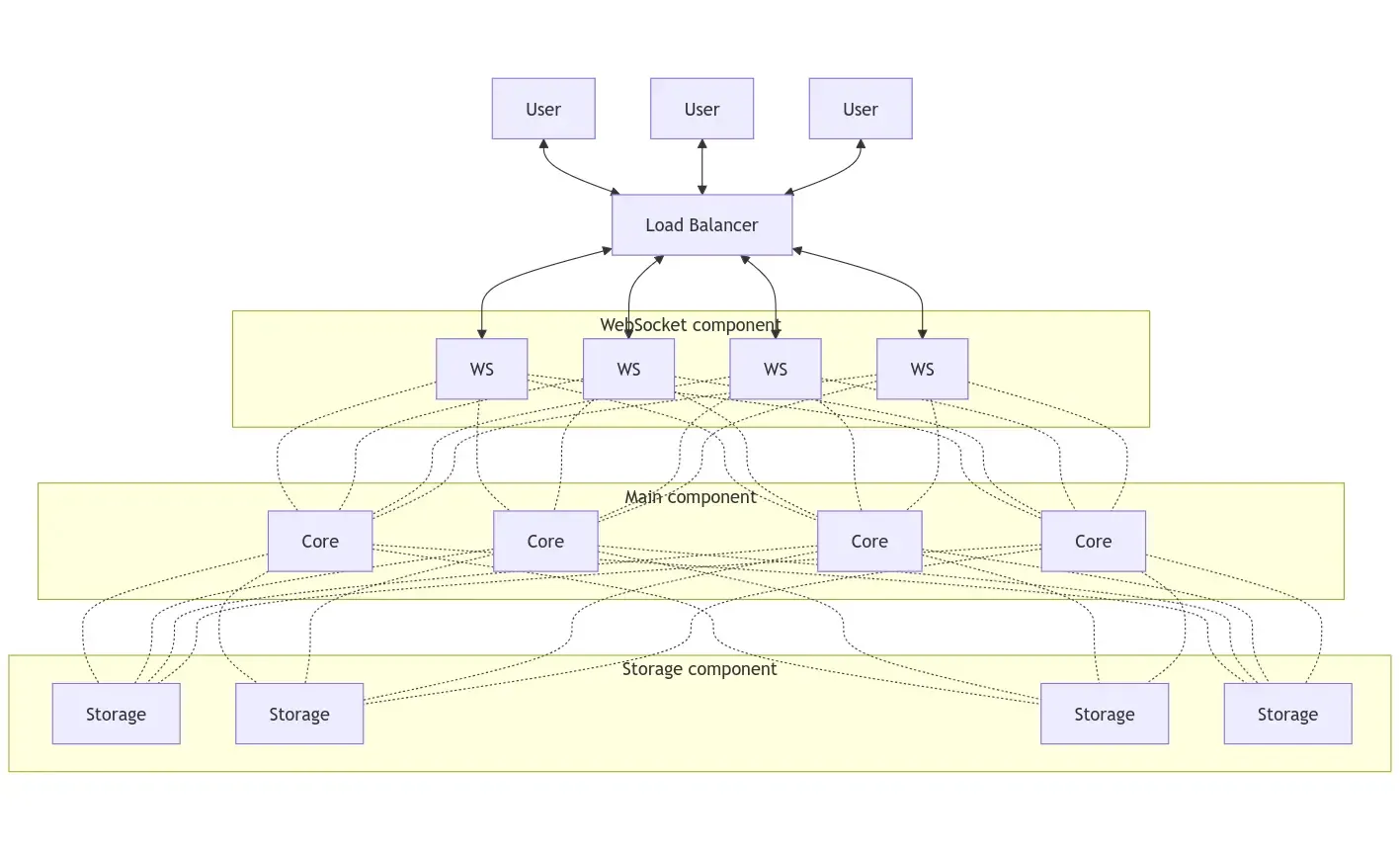
In recent months, users on our flagship instance, cryptpad.fr, which is by far the largest in terms of users and activity, have occasionally experienced performance issues. This means that the limitations of the current single-node architecture have begun to constrain the project’s growth. On the upside, CryptPad continues to perform very well on smaller instances.
That is why we have recently begun a complete rewrite of the CryptPad back end. This new architecture will allow the service to run across multiple physical or virtual nodes, distributing resources more effectively and reducing performance bottlenecks. The work is already well underway and we'll keep you updated.
#4 CryptPad Notes to replace Rich Text
The CryptPad Notes project will replace Rich Text, one of the most widely used applications, with a modern alternative. Rich Text relies on CKEditor 4, which reached end-of-life in July 2023 and no longer receives updates or bug fixes.
After careful consideration, we chose BlockNote, a lightweight, Notion-like, block-based editor that provides similar formatting and features through a simplified interface with "/" commands. This update makes collaborative note-taking and screen-based publishing faster and more intuitive.
What's next
The Winter release will be ready until FOSDEM’26 and will focus on Drive UI improvements, broadcast messages, and enhancements to office applications.
*