

This new quarter brings a mix of visible improvements and deeper changes across the XWiki ecosystem.
This release includes updates to real-time editing and Live Data in XWiki Standard, a major Cloud upgrade, and improvements to migration, file handling, and UI/UX in Pro Applications. On top of that, Cristal continues to evolve with a new Nextcloud integration, while CryptPad introduces full history support in office apps and a new scalable server.
Without further ado, let's get into it. (To jump straight to a topic, click it in the table of contents below.)
XWiki Standard
*
TL;DR
- Font Awesome icons in XWiki have been updated, giving the interface and macros a more modern look.
- BlockNote editor no longer relies on Markdown, allowing for more flexible formatting.
- Live Data tables show properties from other classes for a more comprehensive view of your data.
💡 Test the new features and improvements and let us know what you think.
#1 Upgrade of icons in XWiki
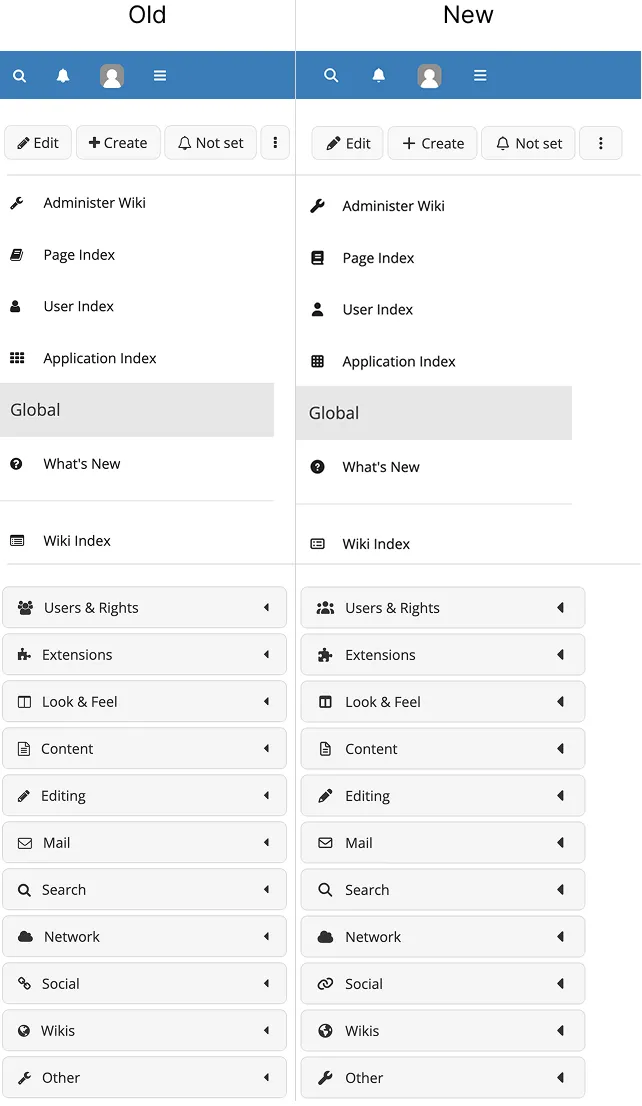
We’ve updated the icons used in XWiki Standard from Font Awesome 4.7.0 to 7.0.1, giving the day-to-day interface and macros a more modern look.
💡 Explore the updated icons and see how the interface and macros feel more modern and polished.
#2 BlockNote integration not dependent on Markdown syntax
The integration is in early stages of development so use it with caution!
The BlockNote WYSIWYG editor doesn't depend on Markdown syntax anymore. It now uses a new JSON-based rendering syntax called Universal Abstract Syntax Tree (UniAst syntax in short), which converts content directly to the wiki syntax used on the back end. Currently, this provides both a parser and a renderer, and it is currently used only by the BlockNote WYSIWYG editor.
For users such as yourself wanting to test the BlockNote editor, editing content becomes more flexible. For example, formatting such as underlined text, which wasn’t possible before, can now be used. Lastly, this change is a step toward making BlockNote the default editor in XWiki in the future.
#3 Improvement in Live Data tables
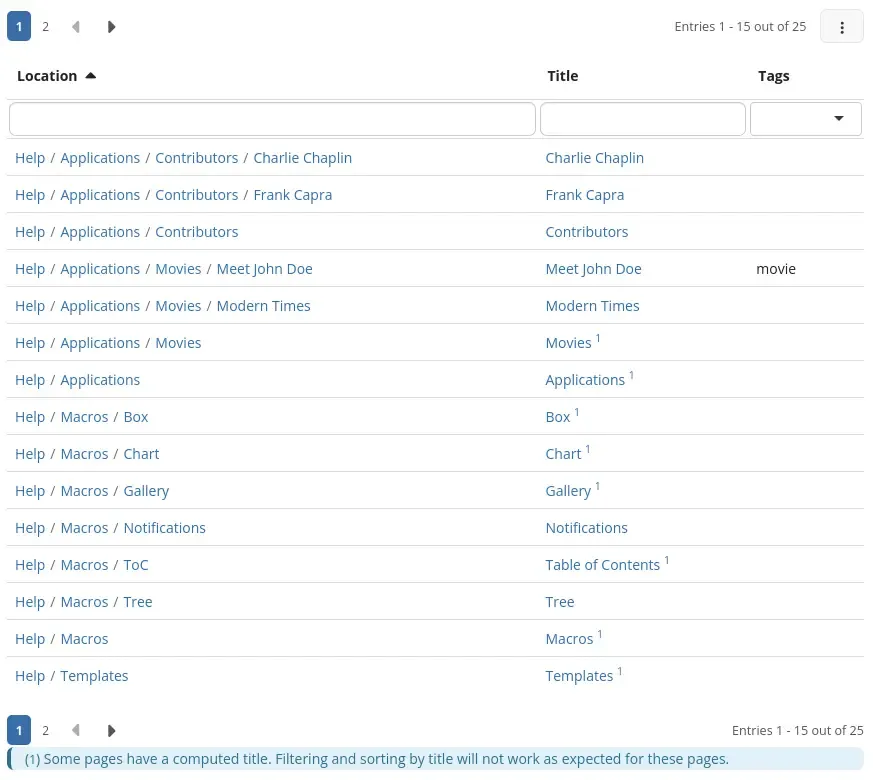
You can display properties of other classes in Live Data tables. This improvement addresses advanced use cases and it makes it easier to create more advanced tables where data from different objects on the same page is shown together.
For example, you can now display all pages and their tags without needing to filter out pages that don’t have tags. This gives you a more complete view of your data and makes your tables more flexible.
💡Try the Live Data tables and let us know what you think of the improvement. Does it help you organize your data better?
What’s next
The team has been hard at work to create an improved Distribution Wizard and Product Tour in XWiki. We'll announce it when the first version is out.
XWiki Cloud
*
TL;DR
- Your XWiki Cloud instance has been upgraded to version 17.10.4, with new features, fixes, and security improvements.
- The XWiki Network upgrade adds subscriptions for Pro Apps, improved discount system, and better partner support.
- Behind-the-scenes improvements make the platform more stable and easier to update.
#1 Instances upgraded to version 17.10.4
XWiki Cloud instances have been upgraded from version 16.10.12 to v17.10.4. This change brings a range of improvements, security patches, fixes, and new features to your environment.
One of the key updates is an improvement to real-time editing: You can undo or redo only your own changes, without affecting edits made by others, as long as there are no conflicts. This makes collaboration safer and more predictable when multiple people are editing at the same time.
#2 XWiki Network upgrade
We’ve also delivered a significant upgrade to the XWiki Network, bringing both new features and important improvements to existing workflows.
Here’s what’s new:
- You have a subscription option when ordering Pro Apps which makes it easier to manage recurring purchases.
- The discount system has been improved and offers more flexibility and better handling of pricing rules.
- We’ve added support for clients managed by XWiki Partners, making collaboration smoother across different setups.
- Various under-the-hood improvements enhance performance, stability, and overall reliability.
#3 Other general improvements
The first quarter of 2026 comes with a series of foundational improvements to XWiki Cloud. While most of these changes happen behind the scenes, they play a key role in making the platform more stable, easier to maintain, and faster to evolve.
More specifically, we’ve streamlined parts of our infrastructure and internal processes so that future updates can be rolled out more efficiently. This means quicker delivery of new features, smoother upgrades, and fewer disruptions for both Cloud clients and demo users.
What’s next
We are currently working on integrating Stripe as a payment processor, which will further simplify payments and improve the overall billing experience.
Pro Applications
*
TL;DR
- Confluence Migrator (Pro) now allows larger migration tests (up to 200 pages), adds support for more Confluence macros, and improves metadata handling and reporting.
- The latest version of Pro Macros adds CSV file support, improves PDF compatibility, and gives more flexibility in macro customization.
- Diagram Application (Pro) brings more stable full screen editing and easier access to draw.io keyboard shortcuts.
- Task Manager Application (Pro) benefits from UI/UX improvements for the task card and kanban board macros and improves task management, reporting, and filtering.
- Minor fixes across all Pro Applications improve stability and user experience.
#1 Larger migration tests, additional macros, and improved metadata handling in Confluence Migrator (Pro)
In the last quarter, we've been hard at work to make migrating from Confluence to XWiki easier with a new set of improvements focused on evaluation, compatibility, and reporting.
The trial limit has been increased from 30 pages to 200 pages. This allows you to work with more representative datasets and better understand how the migrator performs on real content before committing to a full migration.
On the compatibility side, support has been extended to additional Confluence macros. Elements such as ui-button, ui-tabs, and ui-steps are converted into XWiki-specific syntax, helping maintain structure and functionality when content is transferred.
Metadata handling has also been improved, with support for migrating Confluence sets so that more contextual information is preserved throughout the process. In addition, the migration report has been enhanced to provide clearer visibility into what was successfully migrated and where adjustments may be required.
💡 Try out the new migration experience and see how it fits your use case.
👉 Share your feedback with us on the Store or on GitHub.
#2 CSV support and better document compatibility in Pro Macros
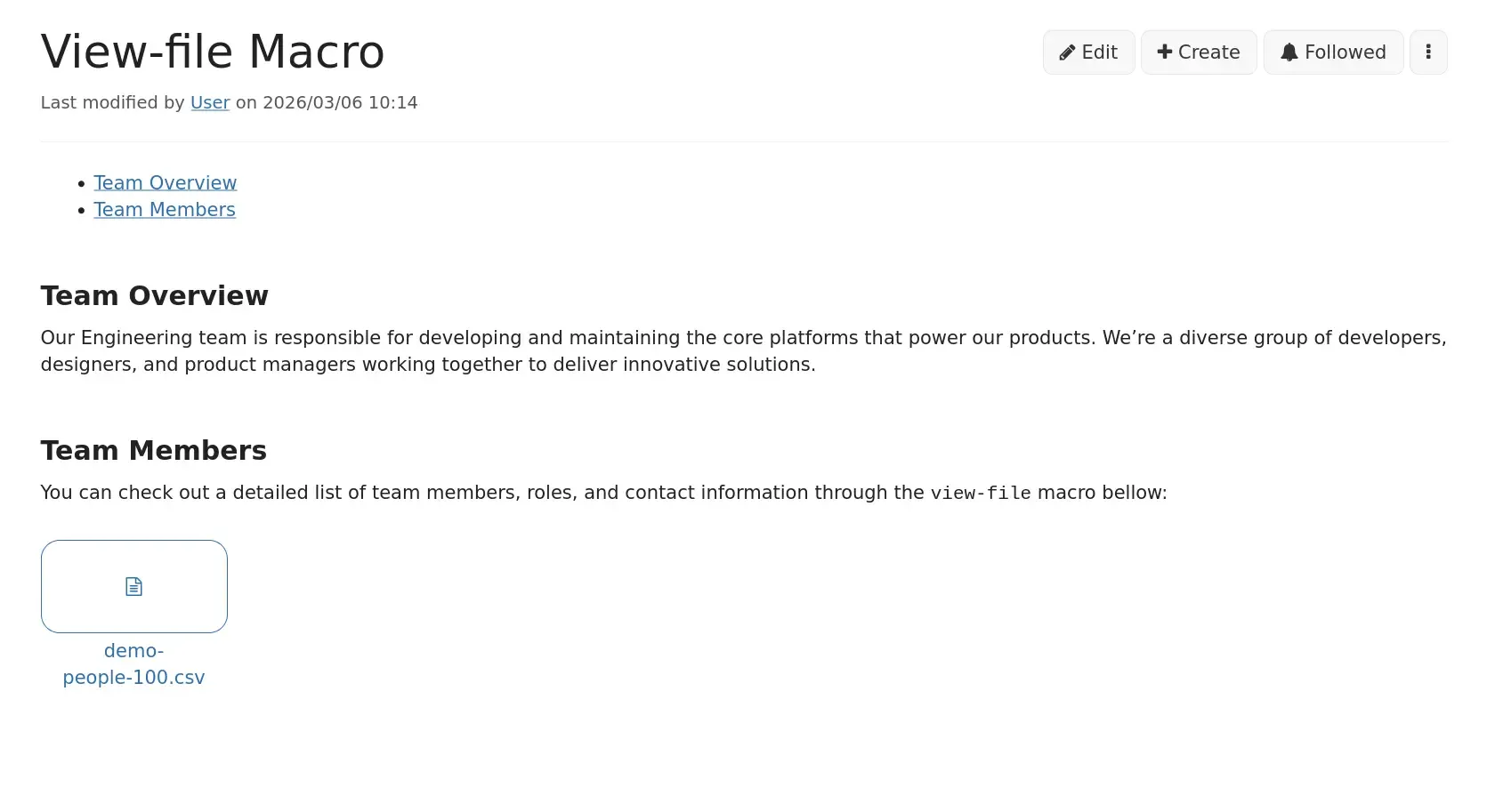
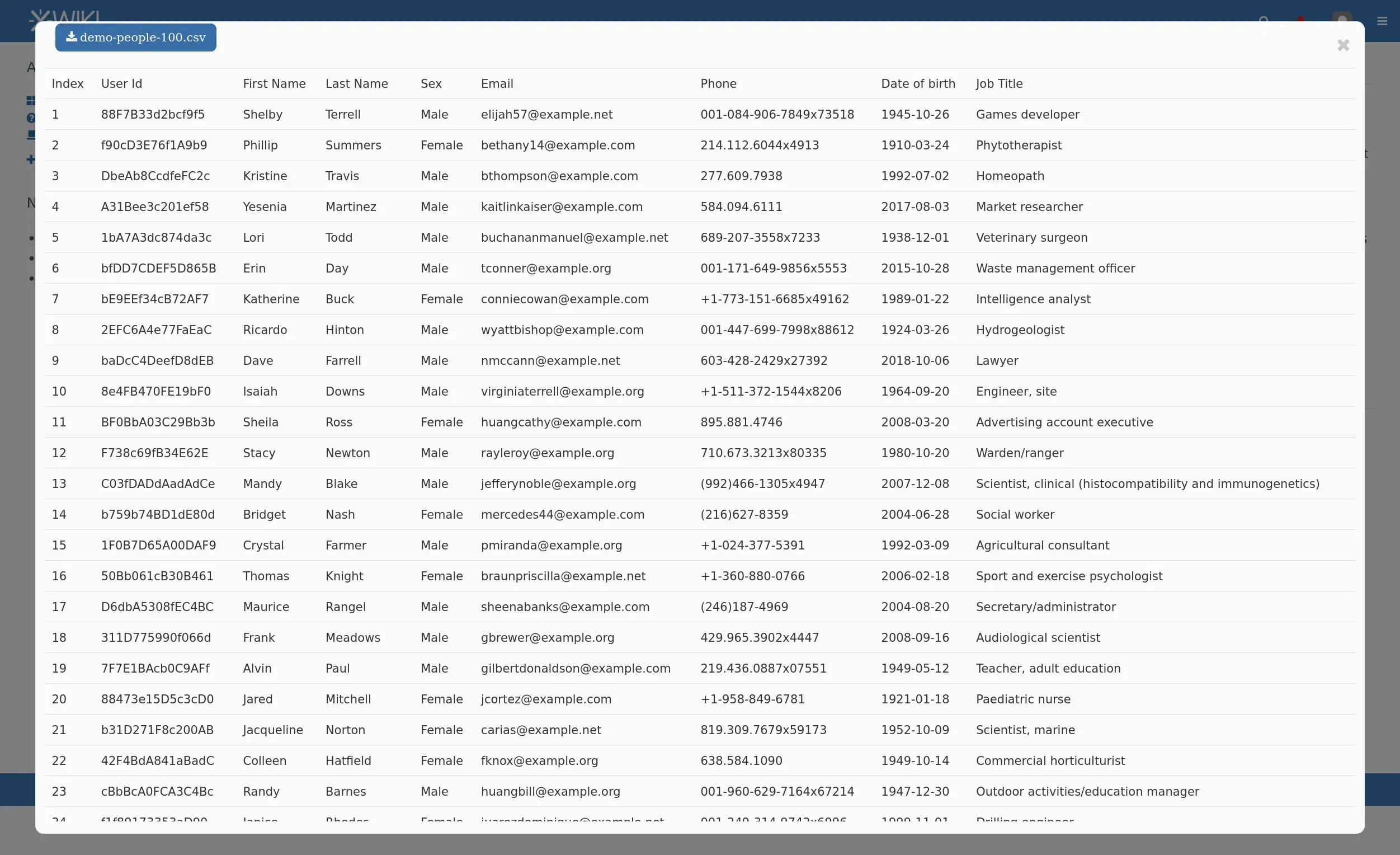
The latest version of Pro Macros extends the view-file macro with support for CSV files, making it easier to display structured data directly in pages. It also improves compatibility with XWiki 17.10.1+ for more reliable PDF rendering across environments.
Macro customization has been expanded as well, giving content writers and regular users more flexibility when adapting macros to their needs.
💡 Try out CSV support in the latest version of Pro Macros by installing it in your XWiki instance and activate your free trial from the License section.
#3 More stable full screen editing and faster shortcut access in Diagram Application (Pro)
We worked on the full screen diagram editor to make its behavior stable while zooming in and out on diagrams. Backwards compatibility has also been improved, helping ensure diagrams continue to work correctly across different versions. We also fixed the Keyboard Shortcuts section and now it opens a SVG file in a new tab which contains all draw.io shortcuts.
👉 Let us know what you think of the latest improvements on the Store or on GitHub.
#4 UI/UX improvements and smoother task workflows in Task Manager Application (Pro)
We rolled out multiple UI/UX improvements for the task card and kanban board macros, along with fixes for conversion of action items from Confluence into XWiki tasks.
The latest version also brings improvements to everyday task management, with smoother handling of tasks, reporting, and customization options. In addition, task filtering has been improved, making it easier to find and focus on the information that matters.
👉 Let us know what you think about the latest version of this Pro App on the Store or on GitHub.
#5 Pro Apps improvements
In the last quarter we released a series of minor fixes and adjustments across all Pro Applications, focusing on stability and user experience. Overall, these changes contribute to a more stable and consistent experience across the Pro Application suite.
💡 Update to the latest version to benefit from these improvements, and share your feedback if you notice any new issues.
Cristal, a new wiki UI
*
TL;DR
- Cristal is available as a Nextcloud extension and it enables wiki-style note taking on top of your files.
- The navigation tree has been refactored with simpler components and XTree support has been improved for developers.
- User rights are now handled through XWiki’s REST API. This requires XWiki 18.1.0RC1 or higher.
- Translation support has started through Weblate. Community contributions are now possible.
#1 Cristal extension available on the Nextcloud store
If you're a Nextcloud user, you can try out the Cristal extension on top of your Nextcloud files and enjoy a modern, wiki-style note-taking experience.
Here are a few things you can do through this integration:
- Write notes and organize your thoughts in pages.
- Structure pages into a hierarchy (as many levels as you want).
- Link pages together.
- Manage your attachments.
- Navigate with the navigation tree.
- Use auto-suggestion to find content.
- Keep your wiki content in Markdown files.
If you uninstall Cristal, all your data, pages, and attachments continue to remain accessible in Nextcloud.
💡 If you're an admin logged into the Nextcloud App Store, install Cristal in one click and try it out.

#2 Full navigation tree refactor
This update addresses mainly developers. The navigation tree components have been refactored and simplified. The previous components have been removed, and the XTree component has been improved to support more use cases, including lazy loading and custom click actions. Two new design system-agnostic components are now available: NavigationTree and NavigationTreeSelect.
For you, this means a cleaner and more consistent way to build navigation trees. The navigation logic is no longer duplicated across design systems. This in turn reduces the maintenance effort and makes implementations easier to manage. Going forward, supporting a new design system only requires implementing the XTree component to get a working navigation tree.
#3 User rights fetched through XWiki's REST API
The XWiki back end now uses the new feature of XWiki’s REST API to check user rights, instead of relying on the Cristal Integration, the REST Server extension. This ensures a more direct and consistent way of handling permissions, aligned with XWiki Standard. Furthermore, this improvement also brings Cristal closer to XWiki by relying on its native APIs.
In order to access this feature, you will need an XWiki instance starting with v18.1.0RC1 or higher.
#4 Translation support
We’ve started extracting translatable text from XWiki into a format that can be used with Weblate. This means that you can support Cristal by translating some of the available keys, even though an easy language switch in the interface isn’t available yet.
CryptPad
*
TL;DR
- Office apps were updated to OnlyOffice v9.2.0.119 with full history, sharing, and snapshot support.
- A new scalable CryptPad server is in production on the flagship instance cryptpad.fr.
- Two Winter fix releases (2026.2.1 and 2026.2.2) delivered security improvements and multiple fixes. If you self-host a CryptPad instance, we recommend you upgrade.
- New dedicated pages were launched for all CryptPad apps.
#1 Important updates to office apps in the Winter release
This release updates the office applications to OnlyOffice v9.2.0.119 and adds full history browsing, sharing, and creating snapshots in office apps, bringing them in line with other applications (history was limited before). It also features a redesigned folder tree in CryptPad Drive, along with many other improvements and fixes listed in the release notes.
#2 Scalable server in production
The CryptPad team deployed the new scalable CryptPad server to the flagship instance cryptpad.fr. This full rewrite makes the instance easier to scale, more performant, and better equipped to handle the increasing usage from the last couple of months. We thank NLNet for the financial support in improving this essential part of CryptPad's architecture.
#3 Winter fix releases
In the previous quarter we also shipped 2 rounds of bug fixes for the 2026 Winter release. Version 2026.2.1 includes important fixes for office documents, security, and more. However, we made a mistake on the version number. So we followed up with 2026.2.2, which adds another fix for document history in office apps and corrects the numbering.
💡 Since these updates include security fixes, we strongly recommend upgrading your self-hosted instances as soon as possible.
#4 New CryptPad apps pages
Recently the team launched dedicated pages for each of CryptPad’s 8 apps. These new pages highlight key features and how the apps can help you or your team collaborate. They also include real-world use cases and testimonials from users who have tested them. The aim is to help users easily understand how CryptPad can fit into their day-to-day workflows.
What's next
The team is working on the Spring release that will focus particularly on improvements to the Diagram application and other improvements and fixes.
AI assistant
*
We’ve released version 0.8 of the LLM Extension, introducing REST APIs and an MCP server. These allow external AI tools to query content from your wiki.
This is an early step toward integrating AI more deeply into XWiki. With this update, third-party tools (such as AI assistants that support MCP servers) can access indexed wiki content and use it to answer questions.
At this stage, the feature is still limited and mainly intended for advanced users who want to experiment with AI integrations. It provides the foundation for future improvements and more advanced use cases.
💡 Try connecting an AI tool to your wiki content and share your feedback in Jira or in the form below to help shape future AI features in XWiki.